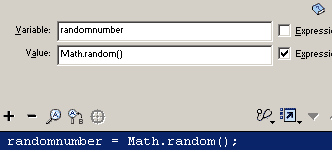
1. Open your movie. Your script in frame 1 of your actions layer should look
like this:
randomnumber = Math.random();
Test your movie. You will see a random number generated every 5
seconds. Notice that the random number is between 0 and 1. This is always
what this script produces.
2. Go back to your movie timeline and click in frame 1 of the actions
layer. We need to multiply the random number between 0 and 1 by 10 to make
the number be between 0 and 10. Add to the line a multiplier, for
the value *10 to
multiply by 10 so that your script now looks like this:
randomnumber = Math.random()*10
Test your movie. Every 5 seconds you will get a random number between
0 and 10. The long decimal that is cut off is what makes this number a real
number. The next tutorial will deal with rounding real numbers to whole
numbers.
3. To get a random number between 0 and 100, set the multiplier to 100
and test your movie.
randomnumber = Math.random()*100
4. To get a random number between 0 and 25, set the multiplier to 25,
randomnumber = Math.random()*25
Random Multiplier Chart:
Generate between
multiply by
0 - 1
0-10
10
0-12
12
0-20
20
0-25
25
0-100
100
5. Now that you have seen how to get random numbers between 0 and
any number, the next lesson will teach you how to make the real (decimal)
number into a whole number, without numbers to the right of the decimal
The next tutorial teaches you how to round the numbers down to whole numbers.