Adding SVG to your FrontPage 2002 (Scalable Vector Graphics)
Objective:
To add Scalable Vector Graphics with Frontpage 2002 Editor Standard Toolbar
 To see the SVG above you will need to add the viewer to your browser. To see the SVG above you will need to add the viewer to your browser.
To insert an SVG graphic as shown above, instead of going into the HTML source code, Frontpage
2002 allows it to be done via the standard toolbar in Normal View.
1. Select "Insert/Web component/Plug in..."
on the standard toolbar, having opened a new page to put this into of course.
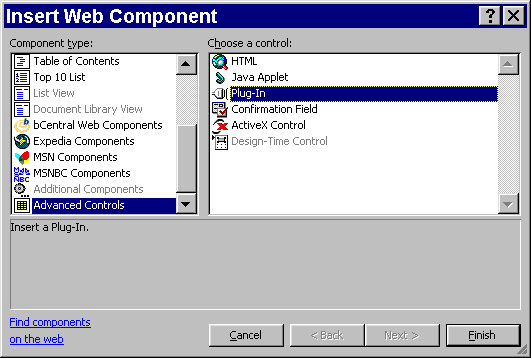
2. Go to Advanced Controls in the Component list, select Plugin, in the
resulting window you will see
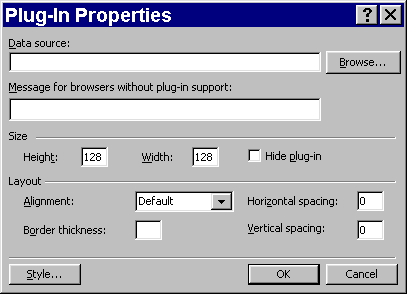
3.
In DataSource enter the filename of the .svg file (if you use Browse the absolute path should appear)
4. Enter the message for browsers without plug-in support
5. Enter the width/height. Set the Alignment, border thickness,
H and V spacing and click OK.
Relative link:
http://www.svg-cafe.com/
-Guy R Cook www.fp2k.net
|








