
|
Reminder |
| Remember to book mark
this site! |
|

Tools: Deformation Tool
by porshiana
- Open your paint shop pro
- Choose file >new and make this picture about 200x 200
-
 Chose
the paint bucket and fill the window with a color Chose
the paint bucket and fill the window with a color
- Now go to file>new again
- Make this file 400x400
- With your arrow key, RIGHT click on the window you colored
- Choose copy
- Now go to the new blank window. RIGHT click
and choose paste as new layer
-
 Now
go up to the deformation tool and click it Now
go up to the deformation tool and click it
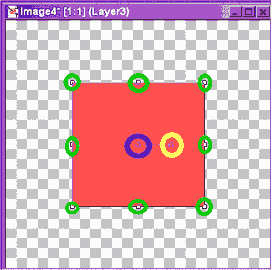
- Notice your image is outlined, and has little boxes on it this is what
the boxes do
-
Notice I circle the boxes. The one in the middle, that I
have circled in blue moves the image around on your page. Click on it, and
move it to see
-
The yellow box which I have circled let's you rotate your
image. Click on this and rotate it
-
The green boxes let you stretch your image in that
direction. Try this out too.
When your image is how you like it, you are done with deformation
|
"Building The Web Into a Nicer Place -- One Site At A Time"
Developing Webs Group Copyright © 2001-2026 All Rights Reserved
Privacy
and Legal
|
|
 |




