 How
to work with Perl on Your Home Computer How
to work with Perl on Your Home Computer
by pixelatedcyberdust,
1/13/04
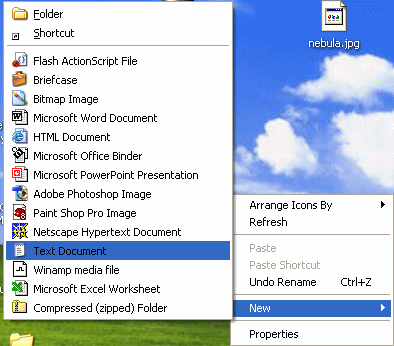
1. Right click on Desktop and select New>Text document
 2. Rename the file as test.pl. In reality you can
call it whatever you want, but make sure it's .pl at the end. 2. Rename the file as test.pl. In reality you can
call it whatever you want, but make sure it's .pl at the end.
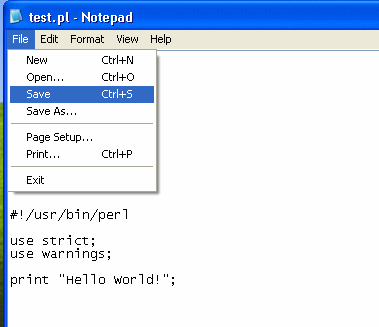
3. Double click your test.pl file and add your perl codes. Then go to File>Save.
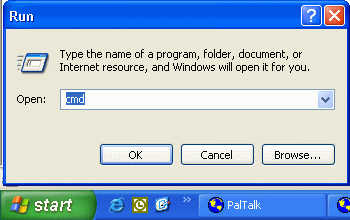
4. Click on your Start menu and click Run. Type in cmd or
command depending what version of Windows you are running. Click enter.

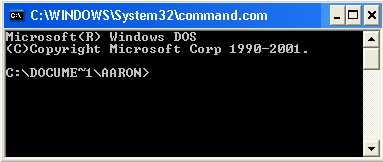
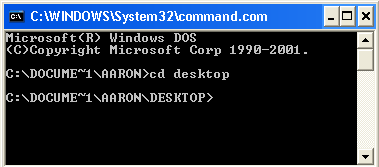
5. If you are not on on the Desktop directory by default, you need to type cd
desktop
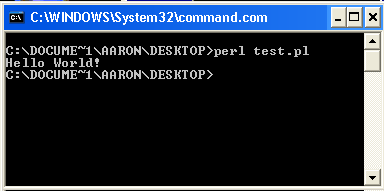 6. To run a perl script, you need to type in perl filename. In our example, test.pl is our filename so we type in perl test.pl.
Click enter and the script should run.
The script will print or do whatever the script is supposed to do after you type in perl
filename.
|







