Organizing Your Site
Foresight
Whether you are building a site on Geocities or at your own domain, your
site should be organized for convenience. This means convenience to you
and convenience to your audience. In the beginning when you build your site,
you may just haphazardly name files and place them all in the same
directory. If your site grows, so does the root directory. This makes it
difficult to locate files you need to edit, files you might name similarly
or even in the worst case scenario, you might overwrite files due to naming
them the same. When your site becomes that huge, organizing would be a
terrible chore. Hence you need to have foresight in organization.
With a new site, it is hard to believe it could ever grow past 5 pages
and 4 images. However, when a webmaster has foresight that the site could
grow, she will organize the site so that growth will be easily
accommodated.
Separation of Images and HTML
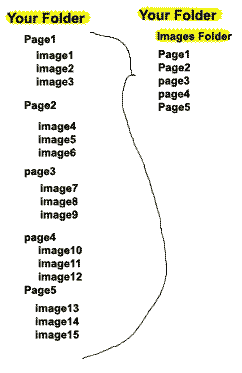 Most
webmasters prefer to separate out the images from the root directory.
Placing images in a separate folder called "images" allows you to keep your
root directory clean, or strictly for the HTML files. When you do this, all
your links to your images will be prefaced with a "images/" so that the HTML
will point to the correct location on your web. Most
webmasters prefer to separate out the images from the root directory.
Placing images in a separate folder called "images" allows you to keep your
root directory clean, or strictly for the HTML files. When you do this, all
your links to your images will be prefaced with a "images/" so that the HTML
will point to the correct location on your web.
It is preferential for pages to share the same images instead of having
duplicate images on the site. As you build your site, the images are
isolated and easily located so that you can reference the same image in each
HTML or select HTML to optimize the amount of space you take up on the
server with your website. Not only do you share images with html pages, when
you use a template of images, the actual template is written exactly the
same so that it makes writing the HTML easier.
In the example on the right, there are20 items in your root directory.
This can be organized to 5 pages and one directory in your root, thereby
making it easier to scan through them.
 Separation
of HTML Docs Separation
of HTML Docs
Larger sites or sites that plan on categorizing sub pages, will want to
group like category pages in the same folder. This allows for linking
directly to your folder for the default page to show up. Sub pages can be
further organized and each folder may have its own images for those just
used in HTML in that folder. Images shares across the folders will be placed
in the main mages folder using the relative linking of "../images/" to
reference one up image directory or "images/" to reference the image
directory within the folder. This will eliminate huge image folders and make
it easier to sort your HTML and keep track.
On the right there are a total of 16 pages. There are only 4 folders and
one HTML page in the root. Each category folder has a subfolder for images
used solely within the category and all the sub pages for that folder. This
is organized for a medium size site.
Categories As Subfolders
There is no standard in this area, however, there is an intuitive and
widely used classification for categories on sites. If a webmaster works
within the common sense of a site, an experienced user can intuitively move
about the site. This allows for your audience to use the site, and for your
peers to help you with the site.
Suggestions for subfolders and their contents
- /images/ used for images
- /contact/ used for placing form HTML, contact information etc.
- /about/ used for HTML that details and describes your company.
- /info/ used for information about your company or for obtaining
information
- /news/
- /help/
- /portfolio/ where you place information about your past works
- /help/
- /cgi-bin/ used for cgi scripts
- /private/ used for information to share between your webmasters but
is password protected to the outside.
- /public/ used for showing clients works in progress
- /projects/ used for showing clients works in progress
|




